
Log every set.
Beat last time.
Liftkeep is a workout log for people who follow a routine. Pick today's workout, log each set with one tap, and see what you did last time.

- iPhone
- Apple Watch
- Android
- English · Türkçe
- kg · lb
What it does
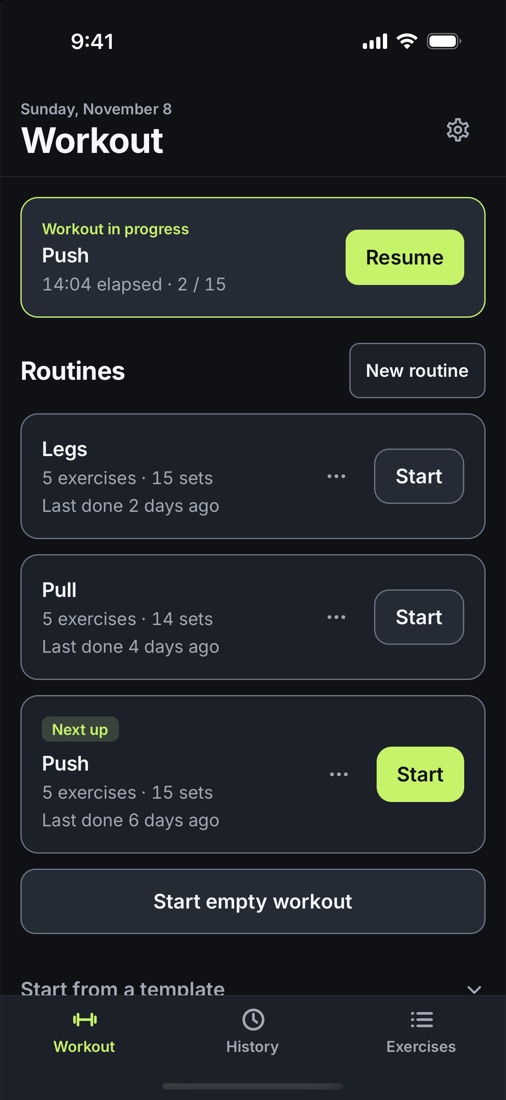
Follow your routine
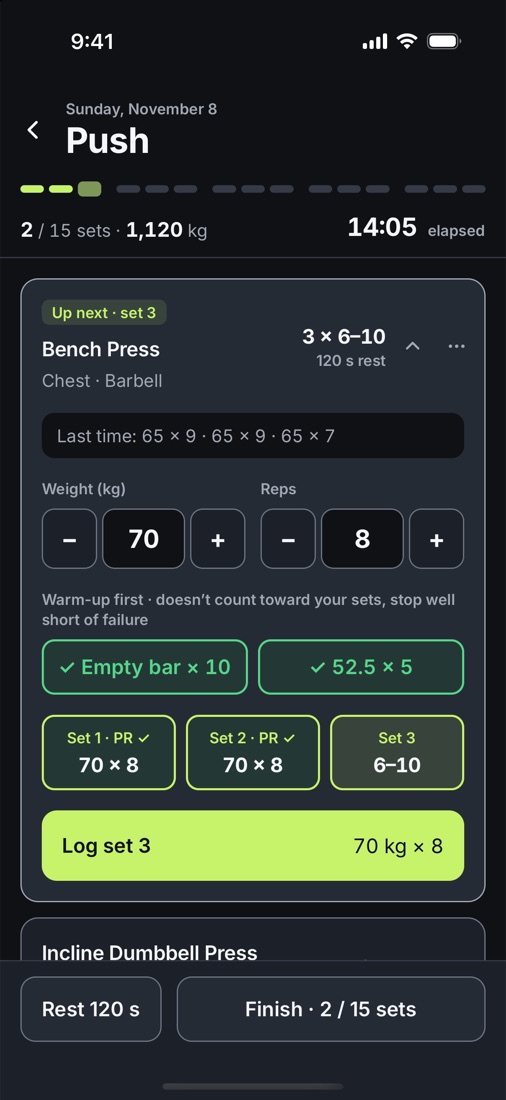
- Build routines with sets, rep ranges, rest times, warm-ups and supersets.
- "Next up" shows which routine is due in your rotation.
- Start from a ready-made routine and change it as you like.
Log fast
- Last time's sets sit next to the inputs, and a hint tells you when to add weight or reps.
- The rest timer alerts you when the rest is over, even with the phone locked.
- On iPhone the running workout shows on the lock screen. On Android it stays in your notifications.
Apple Watch
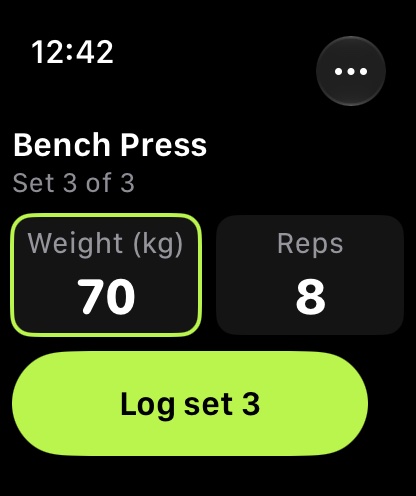
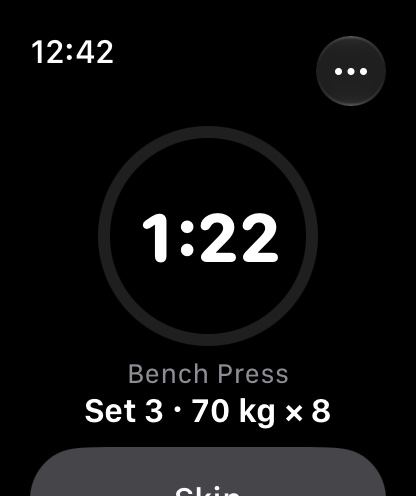
- Start a routine and log sets from your wrist.
- The watch runs the rest timer and vibrates when the rest is over.
- The watch logs on its own and syncs with your iPhone when they're back in range.
See your progress
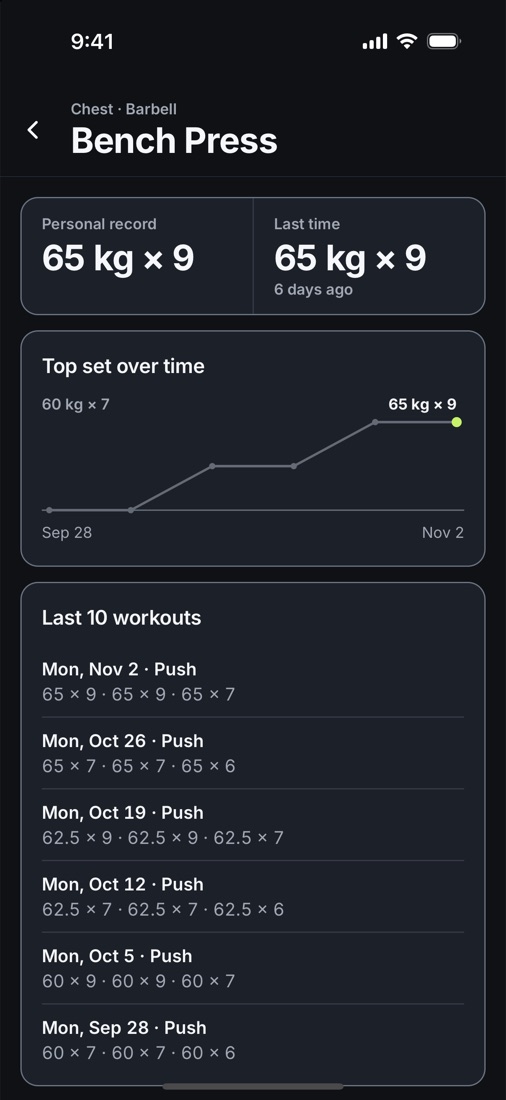
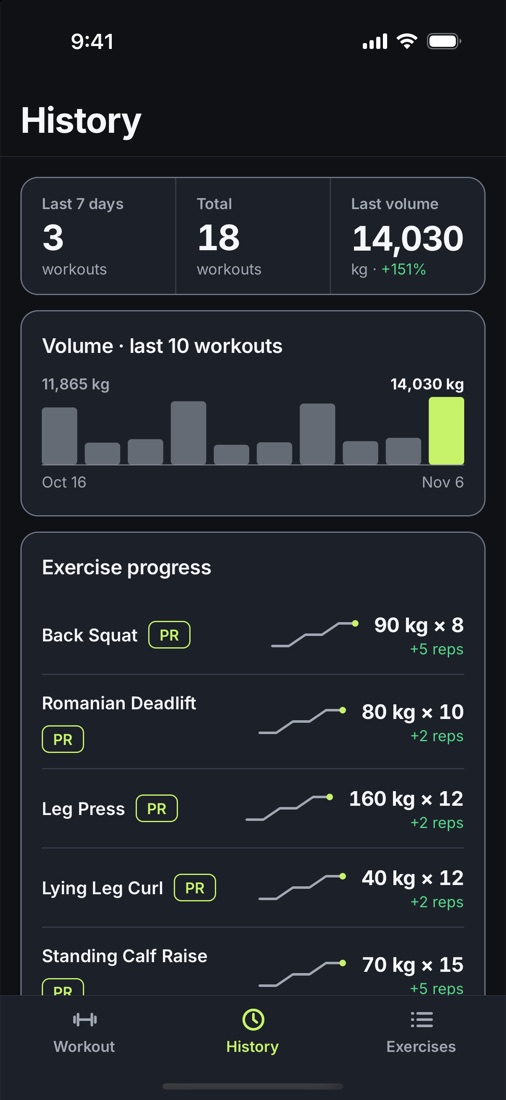
- History lists every workout, with a chart for each exercise.
- Personal records count more reps at the same weight as well as heavier lifts.
- The app backs up your history after every workout. On iPhone it can also save workouts to Apple Health.
Help
Do I need an account?
No. There is nothing to sign up for, and your history stays on your own devices.
How do I keep my history safe on iPhone?
The app writes backup files to its folder in Files › On My iPhone › Liftkeep. Deleting the app deletes its data, including those backups. To keep a copy somewhere else, tap Back up now in Settings and save the file to iCloud Drive or another place. Restore from a backup brings it back later. To install a new version, update the app. Don't delete it first.
How do I keep my history safe on Android?
The app saves a backup on your phone after every workout. Uninstalling the app deletes its data, including those backups. To keep a copy somewhere else, tap Back up now in Settings and save the file to Google Drive or another place. Restore from a backup brings it back later. To install a new version, update the app. Don't uninstall it first.
How do I move to a new phone?
On the old phone, tap Back up now in Settings and save the file somewhere the new phone can reach, such as iCloud Drive or Google Drive. You can also send it to yourself. Install Liftkeep on the new phone, open Settings and tap Restore from a backup.
My routines don't show on the watch.
Open Liftkeep on the iPhone once. The watch gets your routines from the iPhone. If the watch app is missing, open the Watch app on the iPhone and install Liftkeep there.
Do I need the iPhone nearby when I log on the watch?
No. The watch logs on its own, and the two sync when they're back in range.
Why might the rest alert come a few seconds late on Android?
From Android 14, an app can't set exact alarms until you allow it. If the rest panel says alerts may come a few seconds late, tap Fix in Settings and turn on Alarms & reminders for Liftkeep.
Does it work with Apple Health?
Yes, on iPhone and Apple Watch. On iPhone, saving to Health stays off until you turn it on in Settings. The Privacy Policy lists what the app saves to Health and reads from it.
Contact
Email questions, problems or ideas to fatihcan.social@gmail.com. If something went wrong, please include your phone model, your Apple Watch model if you use one, and what you were doing.
Her seti kaydet.
Geçen seferi geç.
Liftkeep, bir rutini takip edenler için bir antrenman günlüğü. Bugünün antrenmanını seç, her seti tek dokunuşla kaydet, geçen sefer ne yaptığını gör.

- iPhone
- Apple Watch
- Android
- Türkçe · English
- kg · lb
Neler yapar
Rutinini takip et
- Set, tekrar aralığı, dinlenme süresi, ısınma setleri ve süpersetlerle rutin oluştur.
- "Sıradaki", rotasyonunda sırası gelen rutini gösterir.
- Hazır bir rutinle başla, istediğin gibi değiştir.
Hızlı kaydet
- Geçen seferki setler girişlerin yanında durur. Ağırlık ya da tekrar ekleme zamanı gelince bir ipucu çıkar.
- Dinlenme bitince zamanlayıcı seni uyarır, telefon kilitliyken bile.
- iPhone'da devam eden antrenman kilit ekranında görünür. Android'de bildirimlerinde durur.
Apple Watch
- Bileğinden rutin başlat ve set kaydet.
- Saat dinlenme süresini tutar ve süre bitince titreşir.
- Saat kendi başına kaydeder, iPhone'unla tekrar bağlanınca eşitlenir.
İlerlemeni gör
- Geçmiş her antrenmanı listeler, her egzersiz için bir grafikle.
- Kişisel rekorlar daha ağır kaldırışları da, aynı ağırlıkta daha fazla tekrarı da sayar.
- Uygulama her antrenmandan sonra geçmişini yedekler. iPhone'da antrenmanları Apple Sağlık'a da kaydedebilir.
Yardım
Hesap gerekiyor mu?
Hayır. Üye olunacak bir şey yok; geçmişin kendi cihazlarında kalır.
iPhone'da geçmişimi nasıl güvende tutarım?
Uygulama yedek dosyalarını Dosyalar › iPhone'umda › Liftkeep klasörüne yazar. Uygulamayı silmek, bu yedekler dahil verilerini siler. Başka bir yerde kopya tutmak için Ayarlar'da Şimdi yedekle'ye dokun ve dosyayı iCloud Drive'a ya da başka bir yere kaydet. Yedekten geri yükle ile sonra geri getirirsin. Yeni bir sürüm kurarken uygulamayı güncelle. Önce silme.
Android'de geçmişimi nasıl güvende tutarım?
Uygulama her antrenmandan sonra telefonuna bir yedek kaydeder. Uygulamayı kaldırmak, bu yedekler dahil verilerini siler. Başka bir yerde kopya tutmak için Ayarlar'da Şimdi yedekle'ye dokun ve dosyayı Google Drive'a ya da başka bir yere kaydet. Yedekten geri yükle ile sonra geri getirirsin. Yeni bir sürüm kurarken uygulamayı güncelle. Önce kaldırma.
Yeni bir telefona nasıl geçerim?
Eski telefonda Ayarlar'da Şimdi yedekle'ye dokun ve dosyayı yeni telefonun ulaşabileceği bir yere kaydet, örneğin iCloud Drive ya da Google Drive. Kendine de gönderebilirsin. Yeni telefona Liftkeep'i kur, Ayarlar'ı aç ve Yedekten geri yükle'ye dokun.
Rutinlerim saatte görünmüyor.
Liftkeep'i iPhone'da bir kez aç. Saat rutinlerini iPhone'dan alır. Saat uygulaması yoksa iPhone'daki Watch uygulamasını aç ve Liftkeep'i oradan yükle.
Saatten kaydederken iPhone yakınımda olmalı mı?
Hayır. Saat kendi başına kaydeder, ikisi tekrar bağlanınca eşitlenir.
Android'de dinlenme bildirimi neden birkaç saniye gecikebilir?
Android 14'ten itibaren bir uygulama, sen izin verene kadar tam zamanlı alarm kuramaz. Dinlenme panelinde bildirimlerin gecikebileceği yazıyorsa Ayarlardan düzelt'e dokun ve Liftkeep için Alarmlar ve hatırlatıcılar iznini aç.
Apple Sağlık ile çalışıyor mu?
Evet, iPhone'da ve Apple Watch'ta. iPhone'da Sağlık'a kayıt, sen Ayarlar'dan açana kadar kapalı kalır. Uygulamanın Sağlık'a neyi kaydedip neyi okuduğu Gizlilik Politikası'nda.
İletişim
Soru, sorun ve önerilerini fatihcan.social@gmail.com adresine yaz. Bir şey ters gittiyse telefonunun modelini, kullanıyorsan Apple Watch modelini ve ne yaptığını da ekle.